Design system services explained [Buyer's guide 2027]


Every growing product faces this problem: Five versions of the same button. Designers and developers fight over spacing and design decisions. A new feature takes twice as long just because the team builds everything from scratch.
This can be avoided with a design system. A design system is a single source of truth for every design decision. It contains reusable UI components, design tokens, style rules, and guidelines for scaling.
This guide answers everything about design systems. You will learn what a design system service is and how it differs from a UI kit or a style guide.
We also cover what to build at each funding stage, what you’ll pay in 2027, how long it takes, and how to pick the right partner.
What are design system services?
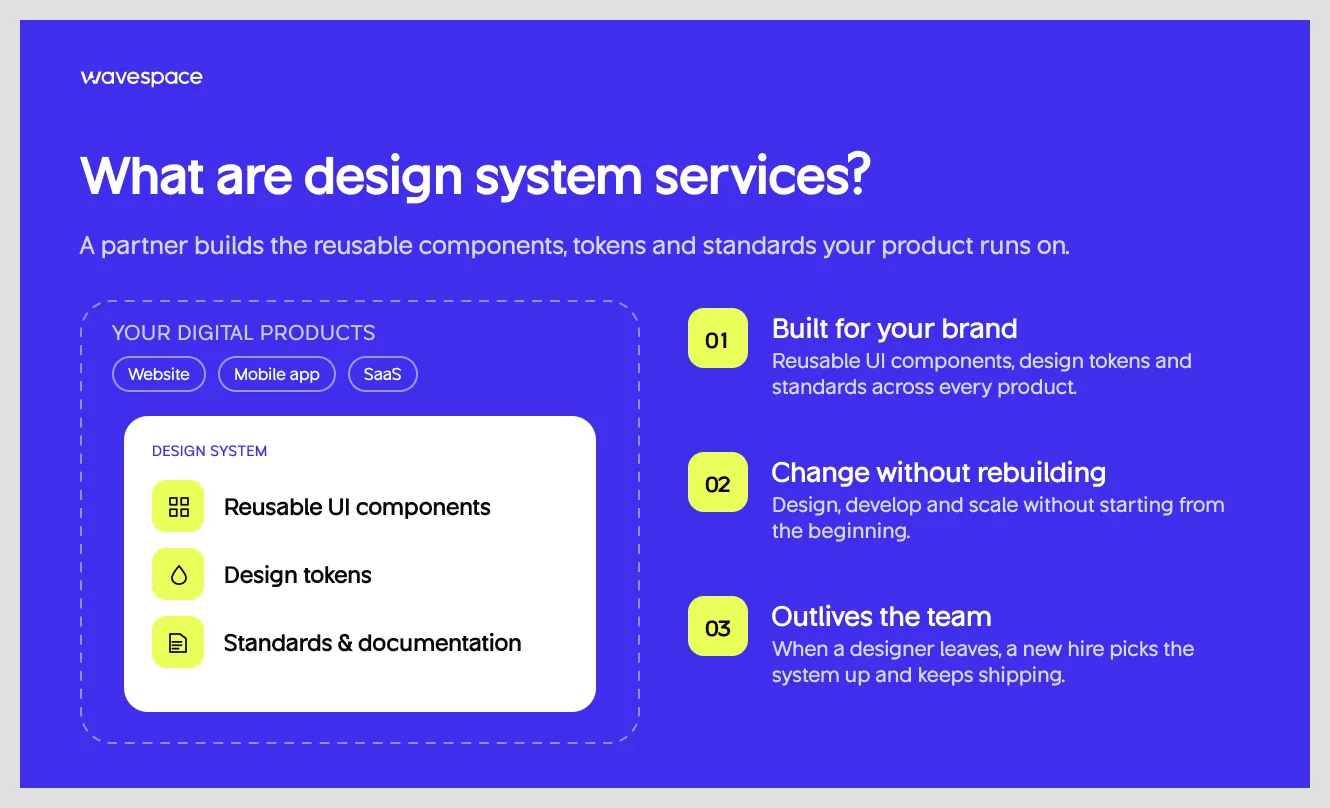
Design system services are a professional service from a design agency that helps build a design system for a brand or enterprise company. This design system contains a set of reusable UI components, design tokens, and standards across their digital products.
With it, a company or brand can design, develop, or scale without any issues. A design system service ensures you can make changes to existing products when the designer/developer leaves.
Simply put, a design system is like documentation that has the sizes, colors, and components to keep a brand design intact.
An example: Suppose your brand doesn't have a design system and a senior designer who’s worked with you for five years leaves. They take the core design foundation of your brand with them. When you have a design system, you don’t have to sweat when someone leaves. A new hire can pick up where they left off and keep shipping.
What's included in a design system service?

Our comprehensive design system services help brands and businesses build digital products that are consistent and scalable. We understand that a good design system will help save money in the future. With it, a company can scale, update, or make changes without starting from the beginning.
That’s why, at Wavespace, we combine design strategy, UI components, reusable design tokens, development documentation, and everything else a brand needs to streamline its workflow and improve the product experience.
Typically, a design system service includes:
- Design System Audit: Evaluate existing systems and identify gaps.
- Design System Strategy: Define architecture, principles, and roadmap.
- Design Foundations: Establish colors, typography, spacing, and layouts.
- Design Token Development: Create primitive, semantic, and component tokens.
- Component Library Development: Build reusable UI components and variants.
- Pattern Library Development: Create consistent UX patterns and workflows.
- Documentation: Provide component guidelines and usage instructions.
- Design-to-Code Implementation: Translate Figma designs into reusable code.
- Accessibility & QA: Ensure usability, accessibility, and quality.
- Governance & Maintenance: Manage updates, versioning, and contributions.
- Training & Adoption: Help teams successfully adopt the system.
All of these save you from building consistency from scratch and give you the advantage of optimizing an existing product and accelerating product development.
Design system vs UI kit vs component library vs style guide
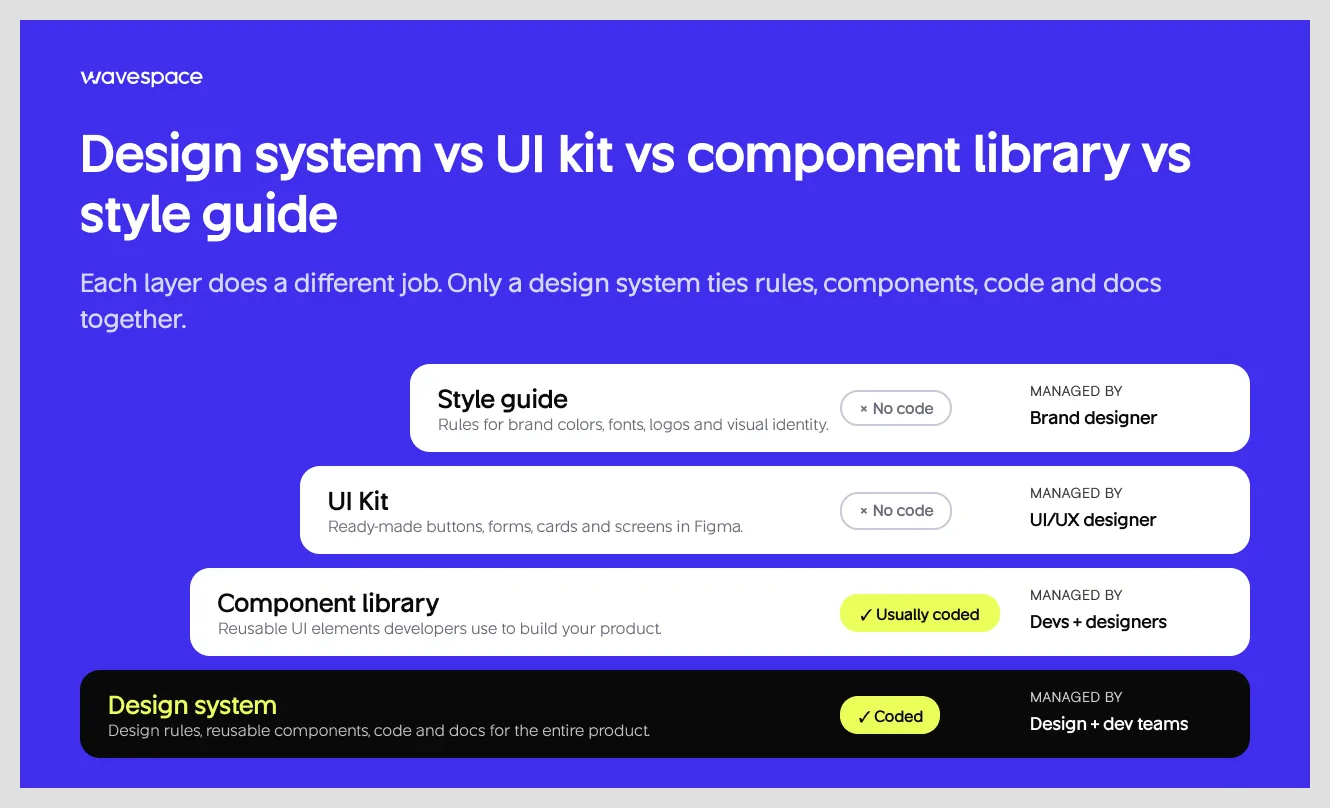
These four might sound the same and create confusion for someone outside the design industry (For a deeper breakdown, see our UI kit vs design system comparison). Let’s make this clear before moving on. These four help businesses keep their digital products consistent in how they look and feel. However, each of them serves a different purpose.
A style guide decides how your brand should look. A UI Kit includes ready-made designs and copy-paste-ready properties. A component library has reusable elements that developers use to build your product.
Lastly, a design system includes a complete set of rules, components, code, and documentation so your brand and product don't drift apart.
For founders:
- A UI Kit helps you design faster.
- A component library helps developers build faster.
- A design system helps your entire team build, manage, and scale your product consistently.
Do you need a design system? A stage-by-stage breakdown
Yes, most funded startups need a design system in some shape or form by Series A or an early lean foundation with a designer and developer. But in some cases you don’t need it, like at the pre-product-market-fit stage with only one designer.
Keep in mind that company size does not determine the need for a design system. How often your team makes changes or rebuilds things is the main deciding factor. You don’t need a design system if you are happy with the product and have no plans to grow it.
But a design system is a must if you want to take the product, whether it's a website, fintech app, or SaaS product, to the next level.
8 Signs that you need a design system
- More than one button, input field, or card style in the live product.
- Designers and developers argue about components and spacing.
- Your design in Figma and the live product don't align.
- Two or more designers working with a team of front-end and back-end developers.
- Your product lives (or plans to ship) on multiple platforms (web app, iOS, and Android).
- New pages or features take longer because the team builds everything from scratch.
- Accessibility is a recurring issue in QA or customer support.
- You're planning a rebrand, dark mode, or a second product line.
What to build at each stage
When not to invest in design system services
A design system is an integral part of a digital product, but not every product needs one. Avoid getting design system services when you are still searching for product-market fit. At that stage, focus on designing lean UX for your MVP instead. Or have one designer who designs from top to bottom. Or you plan to pivot from the initial product plan.
A design system is a collection of design rules. Rules only work for long-term plans. It's not worth it if your design or product changes every two or three months.
In those cases, a UI kit and a short list of tokens are a better option for you. Afterwards, an audit will tell you exactly where to start.
Types of design system engagements
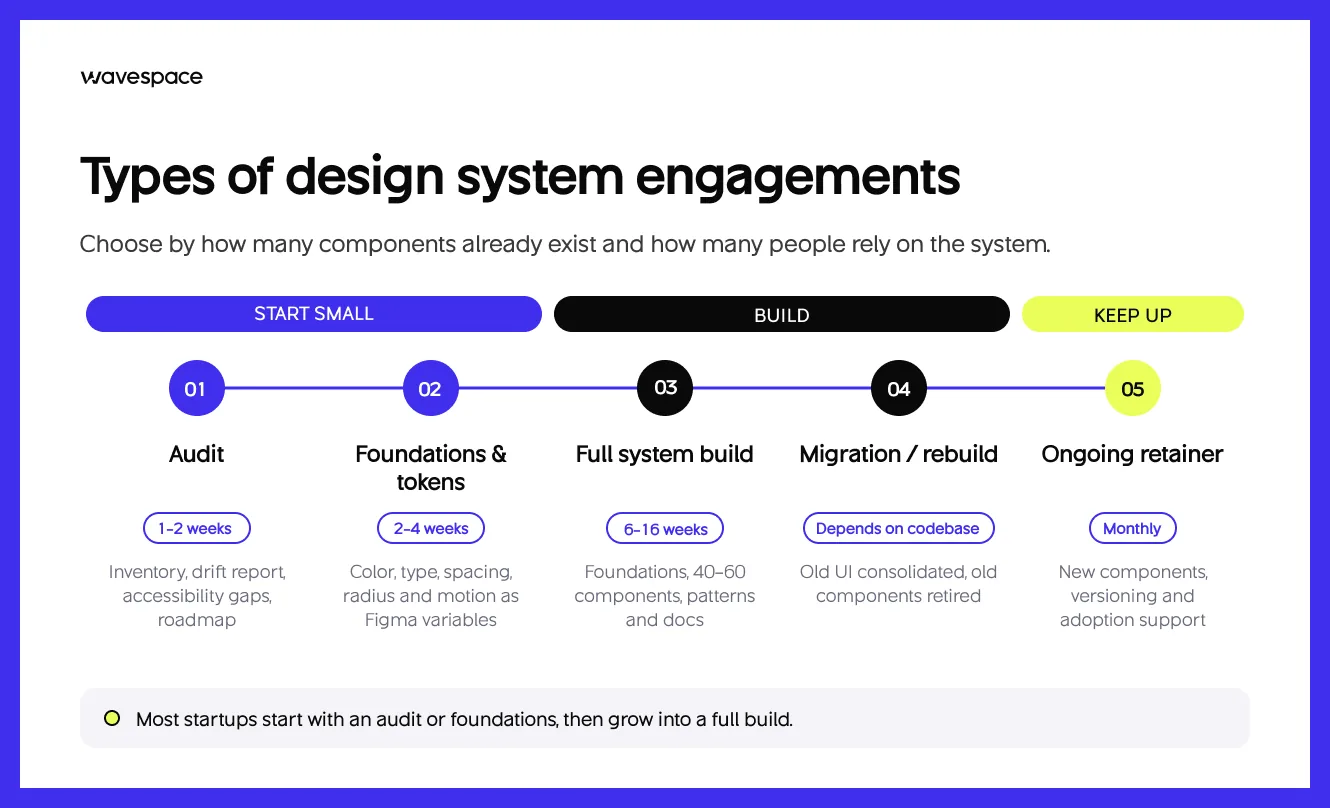
Design agencies offer design system work in five ways: audit, design foundation and tokens, full system build, migration or rework, and ongoing retainer. Most design projects include some design system work. Wavespace includes a design system foundation in every project. For example, we documented every token and built modular components for Kodezi’s design system.
Suppose you have hired us for website design, mobile app design, web app, or SaaS platform design. We will deliver an extensive style guide at the handoff. This can be used by other designers to make additional changes in the future.
A design system service is only needed when you don’t have an existing one or need to rebuild/update your project. In most cases, a startup needs an audit or foundation to get started. Meaning, based on what design system engagement you need, it totally depends on the position you are in.
A great rule of thumb is to choose based on how many design components already exist in the product and how many people rely on the system.
What a design system audit includes
A design system audit is the cheapest way to figure out what you actually need. It costs less than a full system build. For $1,500 to $3,000, you get everything you need to move to the next stage.
- UI inventory: Every different button, input, color, and style type in the product.
- Inconsistency count: A list of buttons, cards, containers, or elements, so you can stop saying "we have a lot of buttons" and say "we have 23 button variants."
- A Figma-vs-code drift report: A detailed report showing where designs and shipped UI have gone down different roads.
- Accessibility report: Accessibility gap report against WCAG AA, with priority labels.
- Roadmap: A prioritized plan that says what to build first, what to remove, and what to leave as it is.
The audit also tells you whether your product most aligns with a lean library or full system. This helps you avoid overspending on design and development.
How much do design system services cost in 2027?
Design system services, depending on the agency, cost between $1,500 for an audit and $60,000 or more for a coded component library with documentation. In our experience, most funded startups spend between $8,000 and $20,000 for a full design system.
However, this depends on component count, platforms, themes, accessibility level, whether components are coded, and which agency is doing the work. Here’s the design system service pricing by scope:
Even though the pricing might sound expensive at first, there are more reasons. Let’s understand what is driving the design system pricing.
What drives the price
Component count: Component quantity increases the audit time = pricing. A system with forty components costs less than a system with 150. A senior auditor has to go through each and tell you how many are in use.
Number of platforms: A web version is just the beginning. Each platform has different component sizes and dimensions. Add iOS and Android, and you now have three platforms to work with. See our mobile app design service for how we scope that.
Themes and brand: Dark mode and light modes add more work. Multi-brand and white-label also add more work.
Design only (Figma) vs. live product: Documenting a Figma file is simpler. Building a system that covers both the design and the live product costs more.
Documentation tooling: Storybook (free), Zeroheight, and Supernova each add setup and ongoing subscription.
Pricing models compared: Fixed project vs. subscription vs. hourly
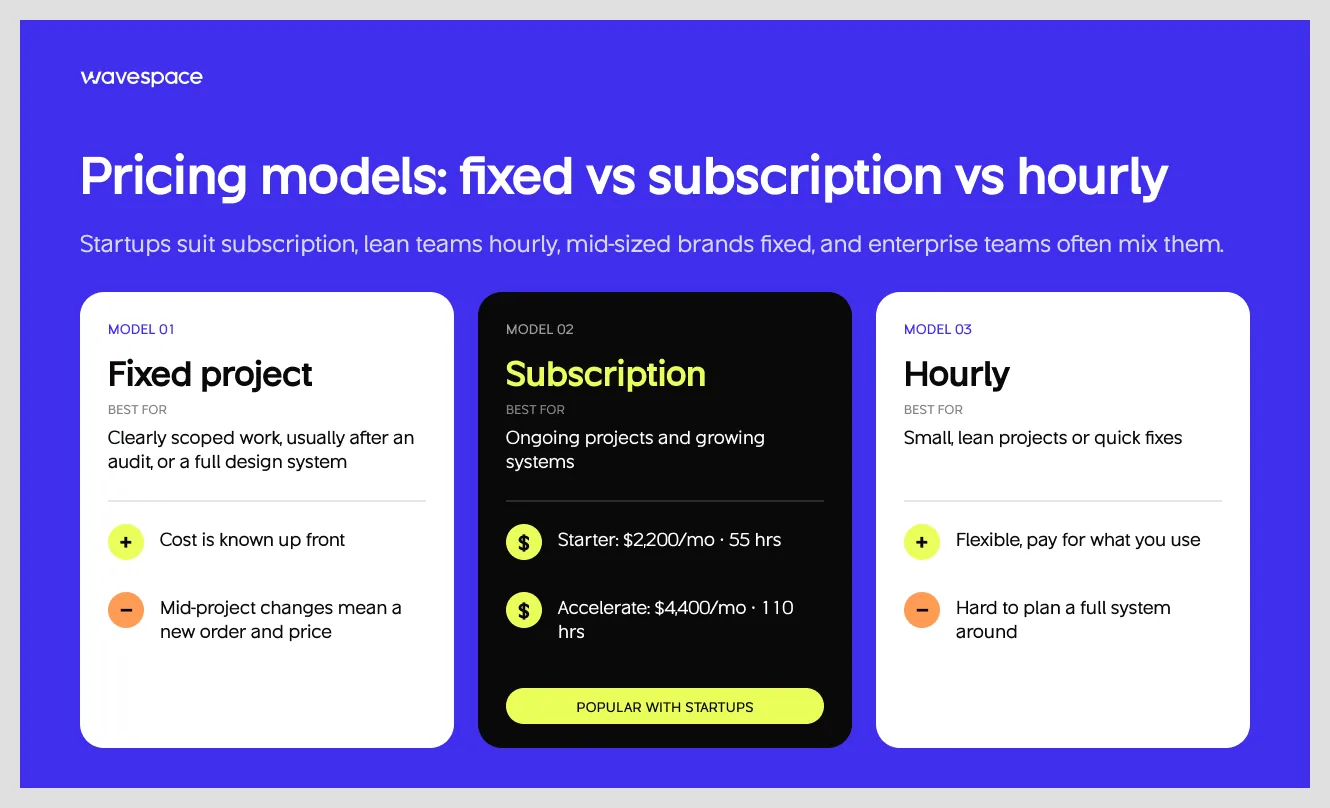
Like design system service engagement, the pricing model also depends on multiple factors combined. Each stage works well with different pricing models.
Startups do well with the subscription or retainer model. Hourly for a lean team; fixed project works best for mid-sized brands, and the hybrid model for enterprise teams.
Fixed project – Best for a clearly scoped project, usually after an audit, or when you need a full design system. You get to know the cost up front. However, mid-project changes mean change orders and new pricing.
Subscription – Best for ongoing projects and growing systems. Here’s why subscriptions work for startups. Our plans start at $2,200 a month (Starter, 55 hours) and $4,400 a month (Accelerate, 110 hours).
Hourly – Flexible for small and lean projects or fixes.
How long does it take to build a design system?
A design system can take from one to two weeks for an audit and can go up to 16 weeks for a full design and code library. Time and pricing of a design system depend on project type and size.
Each product is different. They all have different numbers of screens and components. Here is a rough estimate of how much time it can take to build a design system by product.
What a design system engagement looks like: The Wavespace process
Our design system engagements at Wavespace run in five simple phases. Our phases overlap with each other, so a full system can take four to six, and two to four weeks for a scoped project.
A quick note: Whether it’s a design system, product design, or product development, work can take longer if stakeholders review in batches or a committee has to agree in steps, and can be faster if there is a single decision-maker who can approve work within a day or two.
Agency vs freelancer vs in-house vs off-the-shelf UI kit

The right choice depends on your stage. A design system agency is the fastest for most Seed to Series B startups. An in-house hire or team is best for a product that needs daily work. A freelancer is perfect for one-off or limited-scope projects. A UI kit only makes sense when a generic look is fine.
You can also use one and combine them. Hire a design system agency to get started and an in-house hire to keep everything in check.
Which one to choose? Founders are always asking this question. Wavespace has handled design system work and also provided a design system with other engagements. Let our blog be your guide to find which one suits you the best.
Agency:
Best when you don’t have anyone on the team to build one and are in need of a complete design system. However, if you hire an agency for the work, make sure you get the documentation and delivery plan so you don’t stay dependent on them.
Freelancer or consultant:
A good fit for a small product or a small piece of work. If you want just an audit, token structure, or feedback. But they can backfire when one person has to design and document all alone.
In-house:
The right choice for long-term work, but hiring in-house takes longer than hiring an agency. See what an in-house UX team costs and how long it takes to hire. Only get an in-house team when you have a clear vision and budget is not a problem.
UI Kit:
Honestly, get a UI kit only if you are an early-stage MVP or a pre-seed product. A UI Kit is enough to get started, but it stops being enough when developers need a new component.
Ask 9 questions to choose a design system partner
Choose a design system agency by looking at real work, not just a few good-looking screens. Ask for sample documentation of previous work. Ask them to walk you through the token structure from a past project. Check how design and code stay aligned.
More importantly, ask these nine questions before hiring a design system partner. If you’re still building a shortlist, start with these top design system agencies for enterprise.
The 9 questions below will help you separate the partner who stays through launch from the one who disappears after delivery.
- Do you have experience at our stage and scale? A good answer lists a few comparable projects they've done before.
- Have you built for our type of product? SaaS dashboards, mobile apps, and marketplaces each need different patterns.
- How will you structure our tokens? Look for layers: base values, meaning-based tokens, and component-level tokens. See how token layers work in practice.
- How do Figma and code stay aligned? Look for a single source of truth for tokens and a clear process.
- What is your governance plan? You want an owner, a contribution process, and a versioning rule.
- Can we see real documentation? Ask for two or three samples, not just Dribbble shots.
- How do you handle accessibility? A good answer covers contrast, focus states, and keyboard navigation, not just an audit at the end.
- What support do you offer after launch? Look for retainer options and a handoff plan.
- Who will work on our system? Ask for names and roles, not "our team."
Red flags
- They only show Dribbble-style screens, with no live documentation.
- No plan to align design with code.
- No governance plan.
- A fixed price with no audit first.
- No references you can speak to.
Design system examples worth checking
Here are five public design system examples worth checking before you contact a partner. Note that your product doesn't need a design system of this scale, but it will give a better idea of what a design system looks like in practice. Steal one idea from each.
- Shopify Polaris – Steal the writing guidance so copy stays consistent.
- Atlassian Design System – Steal the clear split between foundations and components.
- Material 3 – Steal the theming model.
- IBM Carbon – Steal the accessibility-first approach.
- Wise – Steal how one product adapts across many markets.
Conclusion
A design system is not a design project. A design system is an investment and a key part of your team moving fast.
But not every team needs one. Skip it if you are pre-seed or changing direction in a few months. A UI kit and style guide will do the work at this stage. But get one if your team has more than one designer, multiple developers, or plans to scale.
The smartest first step is an audit. It’s the cheapest way to check where your brand stands. Whether you need a lean library or a full design system. Whatever you choose, ensure you get the right things: documentation, a named owner, and a plan to keep design and code aligned.
Not sure where your product stands? Book a 30-minute call with Wavespace, and we’ll tell you which engagement fits your stage.
Frequently asked questions about design systems

A design system is a collection of reusable UI components, design guidelines, visual styles, typography, colors, icons, and standards that help teams create consistent digital products.
Popular examples of design systems include Google Material Design, IBM Carbon Design System, Atlassian Design System, Wise Design System, and Apple Human Interface Guidelines. These design systems provide reusable components, design principles, documentation, and guidelines for creating consistent product and user experiences.
To build a design system, define your brand identity and design principles, establish foundations like colors, typography, and spacing, and then create reusable UI components. Document everything in a shared library like Figma, and update based on feedback.
You can find good design system examples on the Figma Community, GitHub, and official design system websites. One of the best resources is the Open Design Systems collection.
There are two main types of system design: High-Level Design (HLD) and Low-Level Design (LLD). High-Level Design focuses on the overall system architecture. Low-Level Design focuses on the internal details of individual components.
A design system helps businesses create consistent, scalable, and user-friendly digital products. It saves design and development time and cost by providing reusable UI components.

More related blog

Design & development in one team. Let’s talk!

















Francisco, CA 94105, United States