App design vs. App development: understanding what you're buying


If you're reading this, you probably have an app idea and a few quotes on your desk. And they don't make sense. One says $20,000. Another says $90,000. Both say "app development." So which one is right? And what are you actually paying for?
I sat on both sides of that table. I started as a freelance designer in 2018. A year later, I founded Wavespace. Since then, our team has shipped 550+ projects. And the biggest problem I see isn't bad code or bad design. It's founders paying for one thing while they think they bought another.
Here's the story I hear most. A founder hires a team to "build the app." The team builds exactly what's in the brief. The app works. But on launch day, people sign up and leave. Nobody planned how users would move through it. So the founder comes to us for a "quick redesign." And it's never quick. Because now we're redesigning screens that are already coded.
I wrote this guide so that doesn't happen to you. No jargon, no sales pitch. Just what app design and app development really are, what you should get from each, what they cost, and who to hire first.
Mobile app design vs. app development: the difference
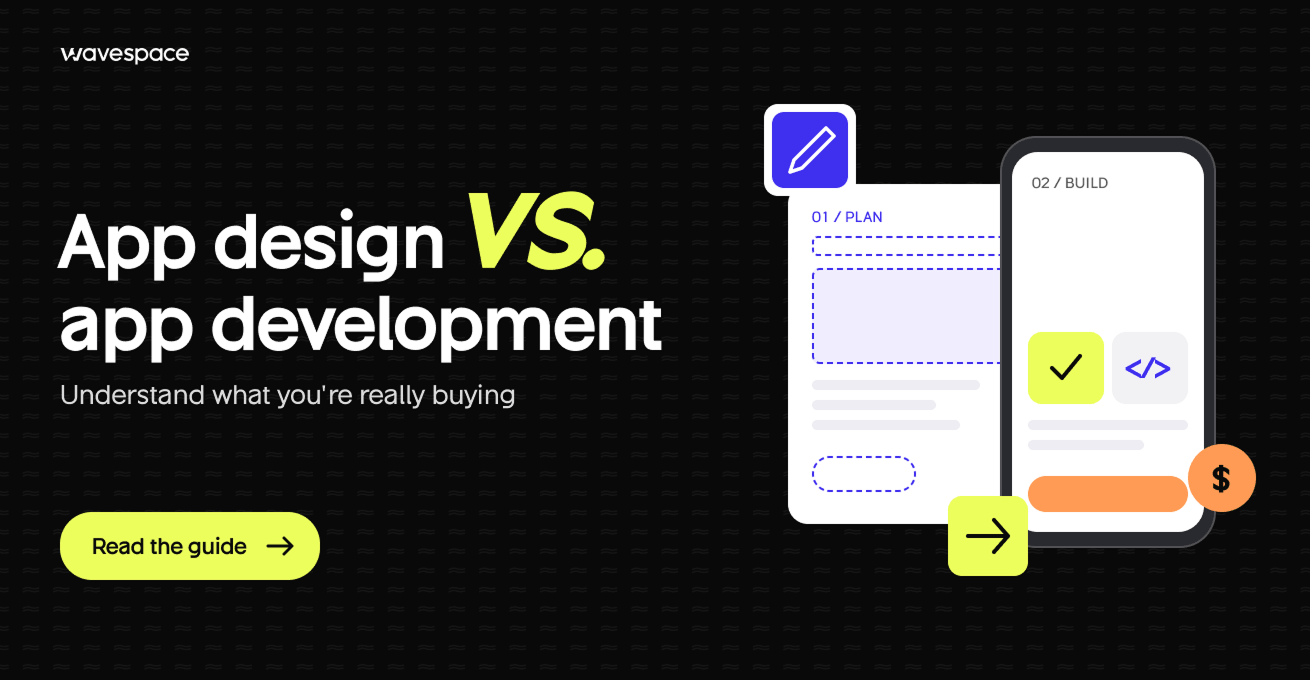
App design is the plan. App development is the build. Design decides the functionality and user experience of the app. Development turns that plan into working code. They need different people, produce different deliverables, and come with different budgets.
What is mobile app design?
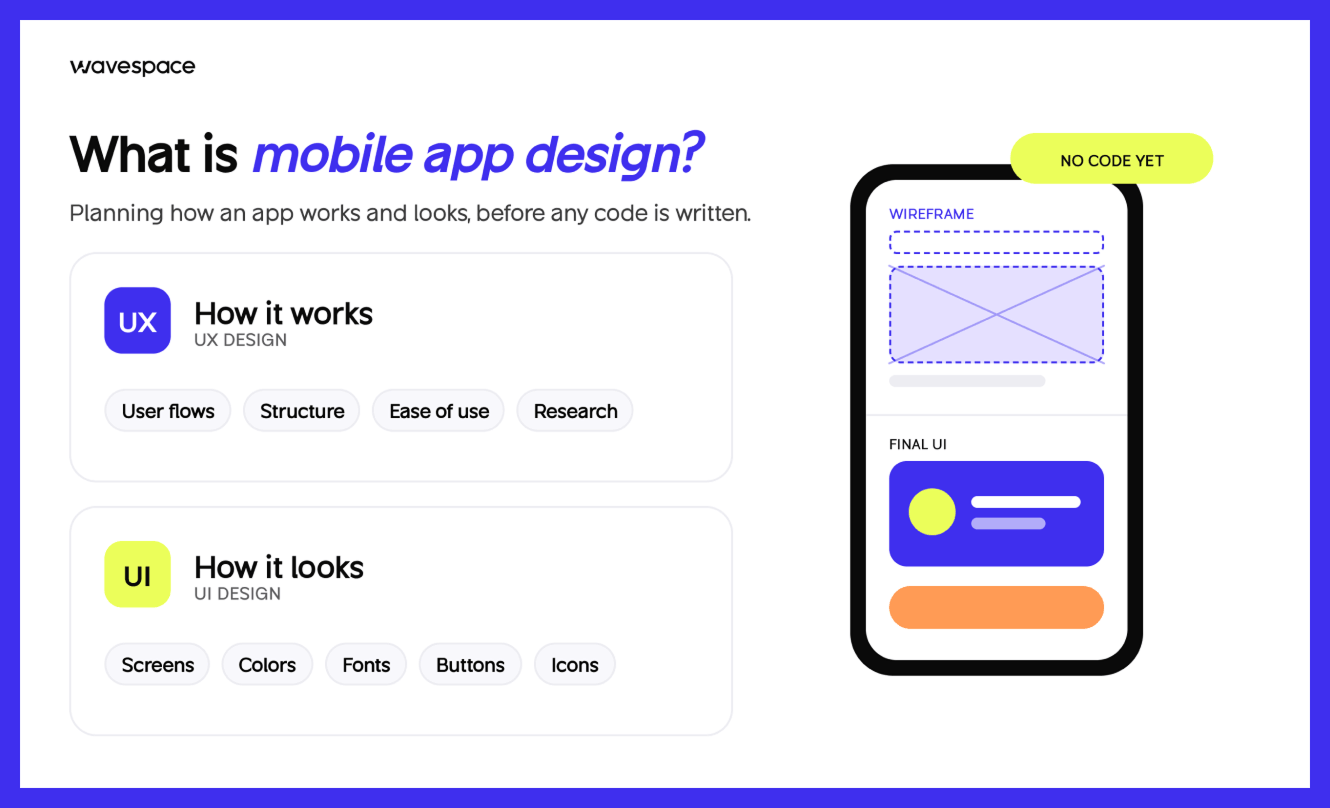
Mobile app design is the process of planning the workings of an app and how it will appear, without any code being written. It covers UX design (user flows, structure, ease of use) and UI design (screens, colors, fonts, buttons). I like to say design is where you make your mistakes on purpose, while they're still cheap to fix.
What is app development?
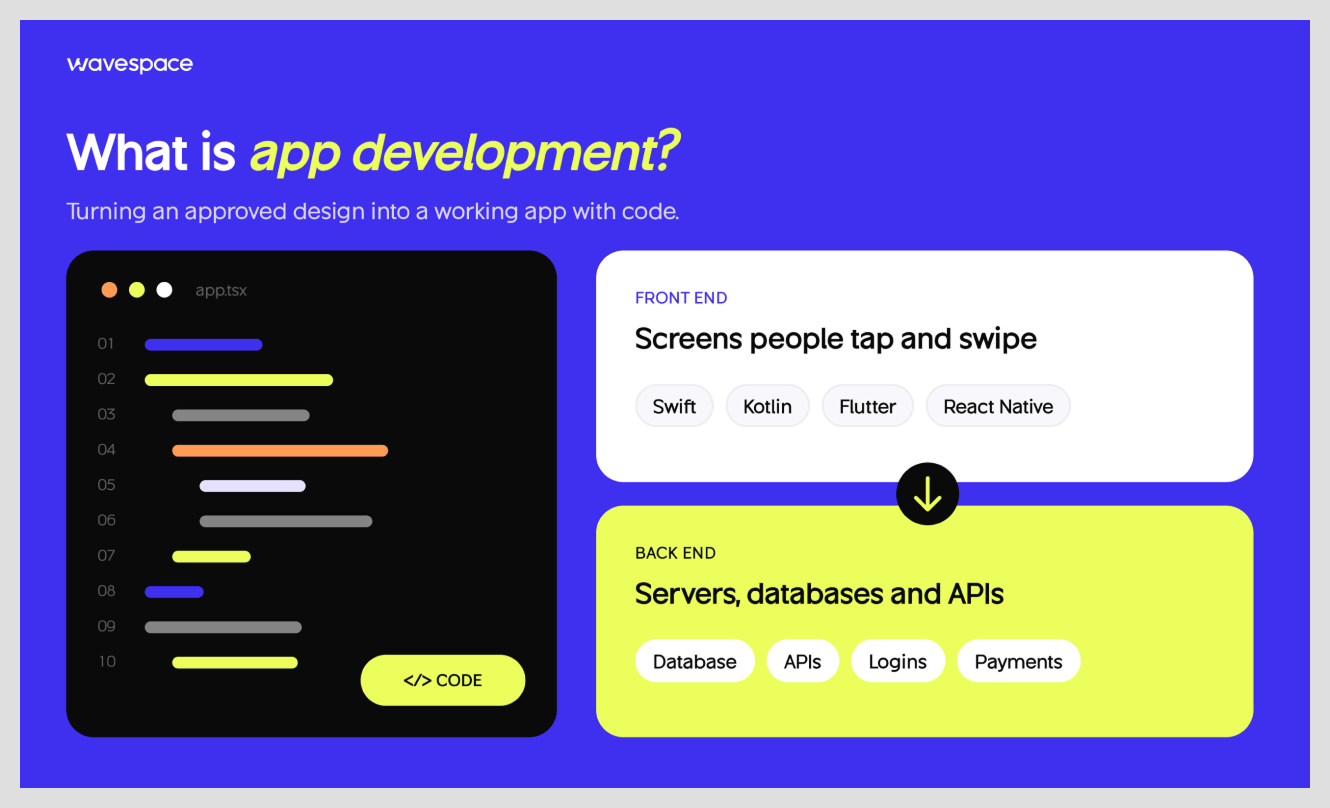
App development is the process of turning an approved design into a working app with code. Front-end developers build the screens people tap and swipe. Back-end developers build the servers, databases, and APIs behind them. In my experience, good developers hate guessing. Give them a clear design, and they move fast.
Is app design included in app development?
Not always. Some development companies include only basic screens. Others expect you to bring the design yourself. So I tell every founder the same thing: look for "user research," "prototype," and "design system" in your quote. If those words are missing, you're paying for code, not design.
App design vs app development: side-by-side comparison
Design answers "what should we build, and why?" Development answers "how do we build it so it works?" When a founder asks me for the difference in one breath, that's what I say.
If you can only remember one row, remember the last row. Ignore development, and you just don't have an app. However, if you lack the design, then you will have an app that nobody wants to use. That one is double the price!
App designer vs app developer: who does what
A mobile app designer decides how an app will function for people. An app developer makes it work on a real phone. I still tell first-time founders with a house about it. The architect draws the plan. The builder pours the concrete. You'd never ask the builder to guess where the kitchen goes.
What a mobile application designer does
An app designer starts with people, not pixels. Who will use this? What do they want? Where will they get stuck? Then they make a plan of the answers:
- User research: talking to real users and studying competitors.
- Information architecture: deciding what goes where, so people can find things.
- User flows: mapping each step of a task, like signing up or paying
- Wireframes: plain, simple layouts of every screen.
- UI design: The final UI design, including colors, fonts, icons, and buttons.
- Prototype: a clickable version you can test before any code exists.
Good designers also adhere to the rules of each platform, such as Apple's Human Interface Guidelines and Google's Material Design guidelines. People expect an iPhone app to work like an iPhone app.
What a mobile application developer does (Front-End, Back-End, Full-Stack)
An app developer writes the code that brings the design to life. There are basically three types of projects that most projects require:
- Front-end developers build what users see and touch, using Swift for iPhone, Kotlin for Android, or Flutter and React Native for both.
- Back-end developers build what users never see, such as servers, databases, APIs, logins, and payments.
- Full-stack developers do some of both. They're a good fit for small teams and simpler apps.
Developers also test the app, fix bugs, ensure data security, optimize speed, and publish it on the App Store and Google Play.
Where design ends, and development begins
The line sits at the design handoff. That's the moment the designer gives developers everything they need: final screens, a design system, notes on how things move, and what each screen shows when something goes wrong.
Honestly, this is where I've seen the most money leak. Not from bad people. From small missing answers. What does this screen show with no internet? What happens when a list is empty? Each unanswered question becomes a developer's guess. And guesses get rebuilt.
Can an app developer design an app?
Some can. I've worked with developers who have a great eye. But designing an app is more than making it look nice. It means talking to users, testing ideas, and fixing problems before they cost money. When a developer designs on the side, those steps are usually the first to go. The app appears good, but is not easy to use.
What you're buying in an app design project
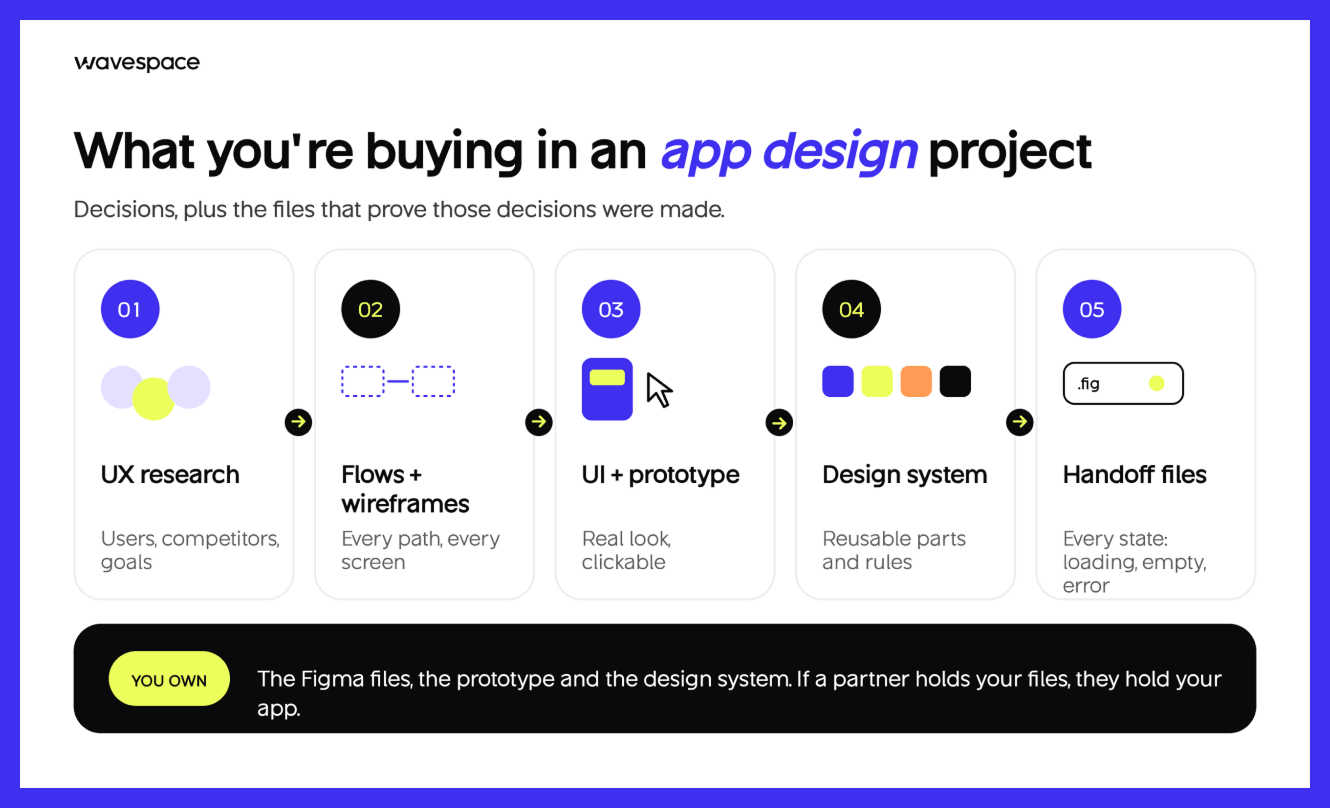
When you pay for app design, you're buying decisions, plus the files that prove those decisions were made. Here's what I'd expect from any design partner, including us. Use it as a checklist when you compare quotes.
UX research and product strategy
This is where the project starts. The team talks to users, studies competitors, and agrees on who the app is really for. You should get a short report with findings and goals.
It's important to you because you don't want to create features that no one asked for. This part is missing if the quote immediately goes to "screens.
User flows and wireframes
User flows illustrate all of a user's possible paths step-wise. Wireframes are simple sketches of each screen. They look simple on purpose. Because moving a box on a wireframe takes minutes. Moving a coded screen can take days.
This is also where the biggest wins hide. When we redesigned the product for ZeroEssay, mapping the flows first helped us cut the steps in its core user flows by 60%. You don't find a win like that by polishing colors. You find it by questioning every step.
High-fidelity UI and interactive prototype
Now the app gets its real look: colors, fonts, images, and icons. Then the screens get linked into a clickable prototype you can tap through on your phone.
Why it matters to you: this is the first time you can feel your app. And it's the cheapest moment to hand it to real users and watch where they get stuck.
Design system and component library
A design system is a collection of reusable elements: buttons, cards, forms, colors, and spacing rules. It keeps the app looking consistent. It maintains the uniformity of the application. It also saves money since each part is built once and used everywhere.
Dev-ready handoff files
This is the bridge to development. Good handoff files include final screens, sizes, motion notes, and every state a screen can be in, like loading, empty, or error. My test is simple: could a brand-new developer build from these files without calling the designer? If not, the handoff isn't done.
Your app design package should include:
- A research summary with user goals
- User flows for every key task
- Wireframes for every screen
- Final UI screens for iOS, Android, or both
- A clickable prototype
- A design system or component library
- Handoff files with every screen state
- Full ownership of the Figma files
What you're buying in an app development project
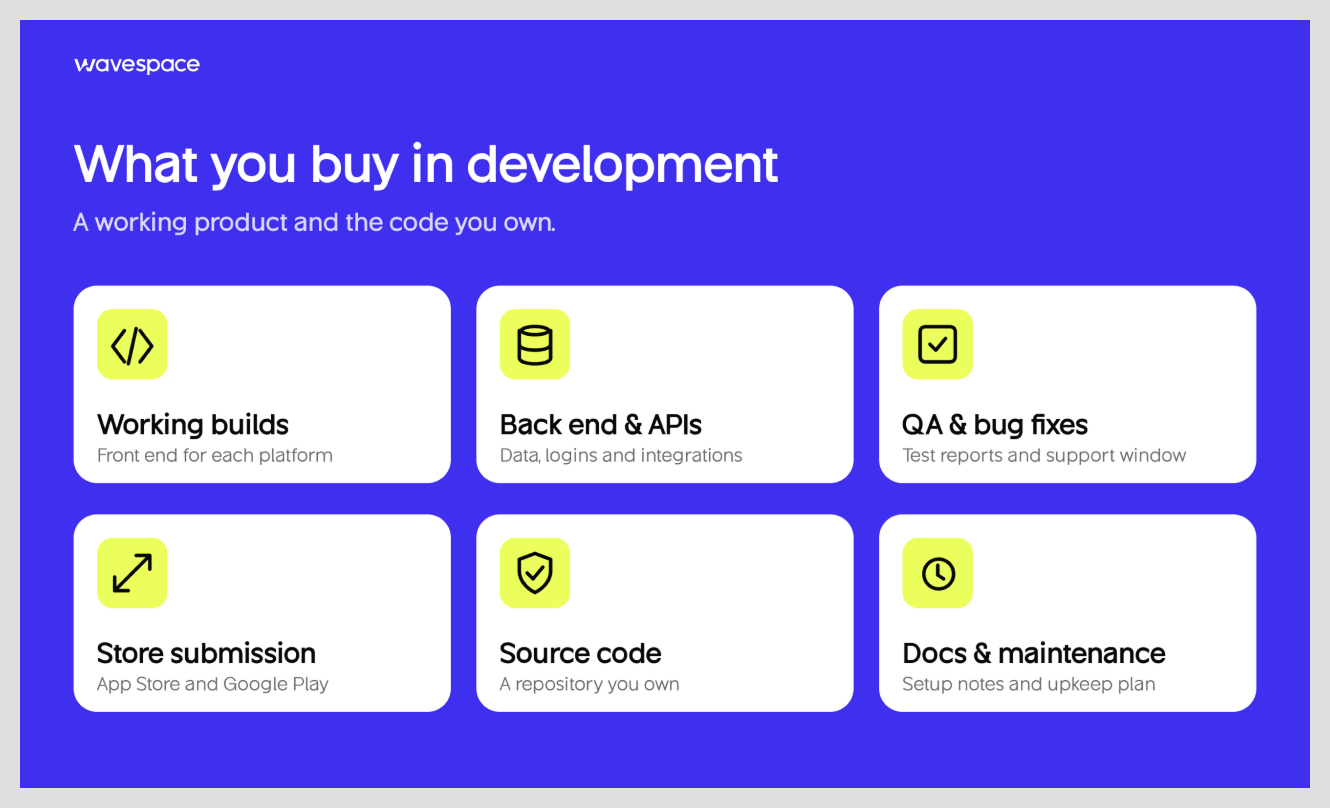
When you pay for app development, you're buying a working product and the code behind it. Here's what a solid development project should hand you, plus the one question I'd ask about each part.
Front-end build: Native vs cross-platform
The front end is everything people touch. Native apps are built separately for each platform, with Swift for iPhone and Kotlin for Android. They often feel the smoothest. Cross-platform apps use one codebase for both, with Flutter or React Native. They are typically quicker and cheaper to produce.
Ask your developer: "Why is native or cross-platform the right choice for my app?" A good team gives you a clear reason, not a favorite tool.
Back-end, database, and API integrations
The back end is the engine. It holds data, manages login, sends notifications, and integrates with others via APIs, such as Stripe for payments or Google Maps for location. You never see it. But you'll feel it the moment it breaks.
Ask your developer: "What happens when 10 times more people use the app?"
QA testing and App Store submission
QA testers try to break your app before your users do. They try on various phones, slow networks, and weird scenarios. Next, the team makes the app ready for the App Store and Google Play, and deals with the review process.
Ask your developer: "How long will you fix bugs for free after launch?"
Source code, documentation, and maintenance
The source code is your app. You can't own what you don't own. You should also get notes that explain how the code is set up, so another team could pick it up one day. And plan for upkeep. Your app needs to be updated annually, as phones update annually.
Ask your developer: "Will the code live in a repository I own from day one?"
- Your app development package should include:
- Working builds for each platform
- A back end with a database and APIs
- Test reports and a free bug-fix window after launch
- App Store and Google Play submission
- Full source code in a repository you own
- Technical documentation
- A clear maintenance plan and price
App design cost vs app development cost
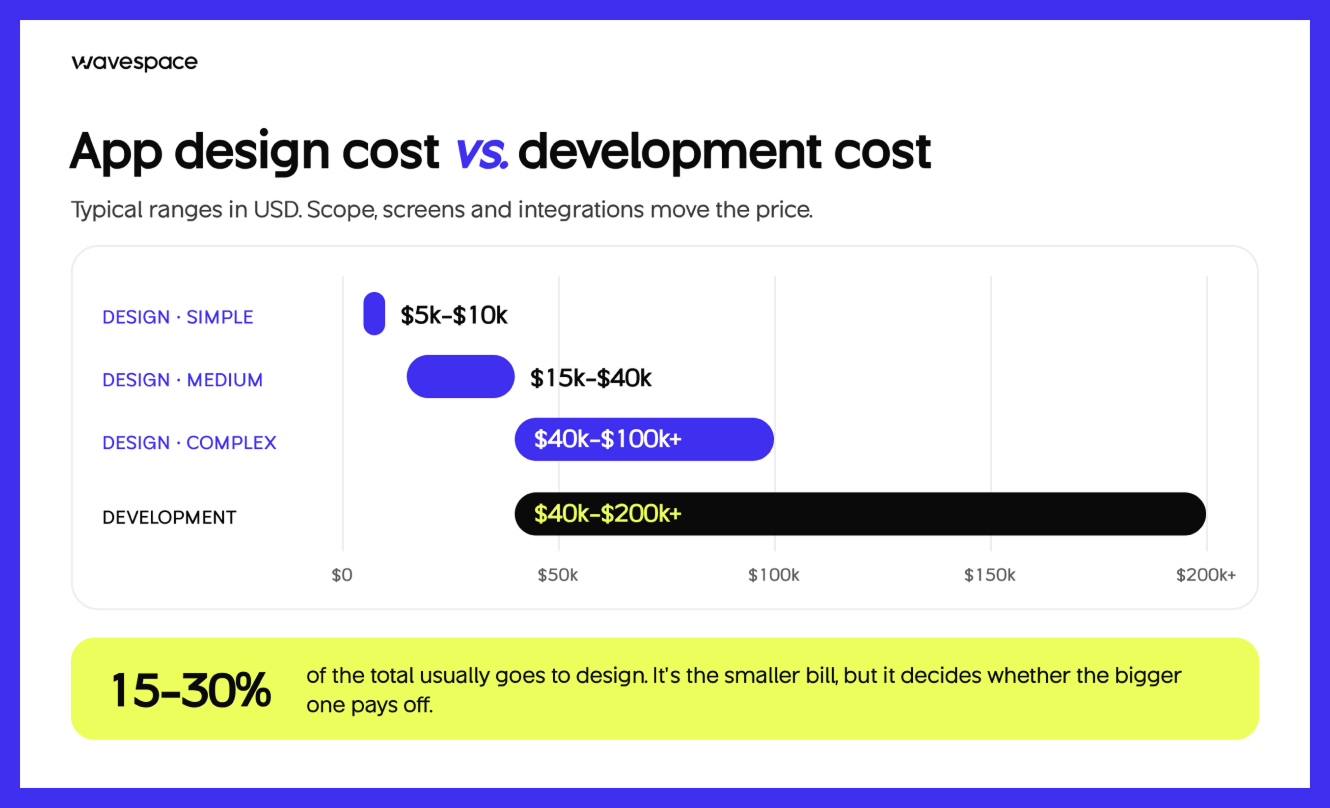
Mobile app UI/UX design usually costs $5,000 to $100,000+. App development usually costs $40,000 to $200,000+. Design is the smaller bill, but it decides whether the bigger one pays off. Let me break that down, then show you how I'd split a real budget.
How much does app design cost?
The cost will vary depending on the number of screens required, the complexity of the flows, and the amount of research and testing desired. Here's a common version.
How much does app development cost?
Development is the bigger bill. Parallel puts development, which covers engineering, QA, back end, and launch, at about $40,000 to $200,000+. Apps with payments, real-time features, or lots of integrations sit at the top of that range.
How much of your budget should go to design?
There's no magic number. But there are good starting points. Parallel says design often takes 15% to 25% of the total for a moderately complex app. We Are Affective sees most clients near a 70/30 split, with development at 70% and design at 30%, and up to 40% to 50% on design for consumer apps.
My rule of thumb is simpler. When users choose your application based on how it feels, such as consumer, social, or lifestyle apps, invest more in design. Spend more on development when people choose it because of what it does safely, like fintech, healthcare, or heavy data tools.
What I'd do with a $60,000 budget
Let's make it real. Suppose that you have $60,000 to spend on the first iteration of a consumer app. If it were my money, here's how I'd split it:
That last row is the one founders skip. And it's the one they always end up needing because real users will surprise you in the first month.
The real cost of skipping design (rework and design debt)
Skipping design feels like saving money. But it's actually a loan, and the interest is not pretty.
Here's what it looks like. The team develops code from a crude concept. Users get confused after launch. Now you pay designers to fix the flow, and developers to rebuild screens they already built. You've paid twice for the same work. That's design debt. And I'd rather you spend that money once, on purpose, at the start.
Who should you hire: Design agency, Dev shop, or full-service team?
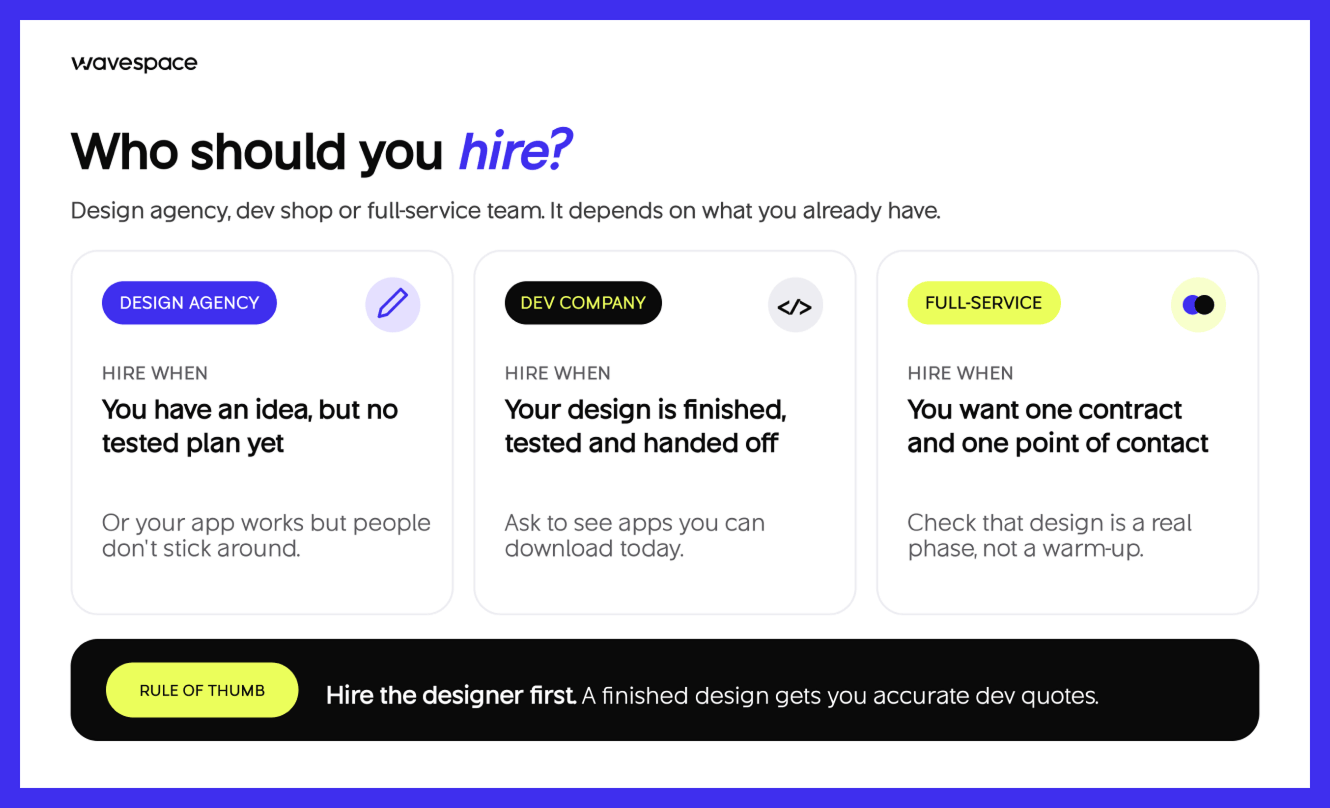
Choosing the right partner is based on your existing content and what you need. Before I start, I'll just note that Wavespace is a design and development company. So I'll be upfront about when each option makes sense, even when it isn't us.
When a design-only agency makes sense
Hire a design agency when you have an idea but no tested plan yet, and you already have developers lined up. It's also the right call when your app works, but people don't stick around. In my experience, that's almost always a design problem wearing a code problem's clothes.
When you need an app development company
Hire a development company when your design is finished, tested, and handed off. You know exactly what to build. Now you need people who can build it well, test it hard, and launch it. Ask to see apps they've shipped, and you can download today, not just mockups.
When a full-service design agency is worth it
A full-service team handles design and development under one roof. You get one contract, one point of contact, and no finger-pointing between two teams. That last part matters more than people think.
But check that the design side is real. Some full-service teams treat design as a quick warm-up before the "real" work. Ask who leads design.
Don't take pretty final screens, ask to see research and prototypes. And ask for design and development as separate phases in the proposal, so you can see what each one costs.
Should you hire a designer or developer first?
Hire the designer first. Because a developer can only build what's been decided, and every undecided detail becomes an expensive guess.
A finished design also gets you more accurate development quotes, which protects your budget. The only exception is a quick technical test, like checking if a tricky feature is even possible. Then a developer can go first.
How AI is changing app design and development in 2026
AI is helping to write code faster and cheaper. And that makes design decisions matter more, not less. Nowadays, founders face difficulties when making decisions because of AI. AI makes the work process faster but creates complexity and a lack of UX design principles. And that's why most products fall into the AI era after launching.
AI coding tools are making the build faster
Today, AI tools can turn a design into starter code in minutes. Developers use them to write, test, and fix code faster than ever. So parts of development now take less time than they did just a few years ago. That's good news for your budget. AI smooths the development process even more than before.
Why design decisions matter more, not less
Here's what I tell every founder who asks me about AI. It can build what you describe. But it can't tell you what's worth building. It has never met your users. I don't know why they quit on screen two.
So when code gets cheaper, the expensive mistake moves upstream. It's no longer "we built it badly." It's "we built the wrong thing, fast." And the faster you can build, the more it costs to build the wrong thing. That's why I believe the research and testing stage is the most valuable part of any app project in 2026.
The fun fact is, AI never knows the usability principles of AI products' interfaces without real user experience.
Questions to ask before you sign a contract
A good contract will protect what you're paying for. Before you sign with anyone, for design, development, or both, ask these questions. A good partner will not hesitate to respond to them.
Who owns the Figma files and source code?
You should. All design files and all source code are yours after you pay, as stated in your contract. Even better, keep them in your own Figma and code accounts from day one. Because if a partner holds your files, they hold your app.
Can you take your design to a different development team?
Yes, if the handoff was done right. Clean files, a design system, and clear notes allow any good developer to follow. Then, simply ask your design partner directly: "Could another team design from this without having to call you?" If they hesitate, the handoff isn't finished.
Red flags in an app design or development proposal
- No user research or testing mentioned
- No deliverables listed under “Design”.
- A fixed price with no clear scope of work
- No ownership of files or code
- No plan for bugs after launch
- A team that can't show apps they've actually shipped
Here is one more from experience. If a proposal feels rushed, the project usually will be too.
Final thoughts: buy the blueprint before the build
The development of an application is an exciting process. It's also terrifying, because it's a lot of cash and a lot of hope being placed on decisions you may not be 100% sure of yet. I get that. I've seen it in every startup founder that I've worked with.
But now you know the difference. App design is the plan. App development is the build. Both matter. And the order matters too. When you do it right the first time, each dollar in your code pays double duty!
So before you sign your next quote, ask one simple question: "Where's the design?" If nobody can show you, start there.
Or if you need another set of eyes on your idea or another quote you've received, I am here for you.
FAQs about app design vs app development

Yes, for small or simple apps. Some people are good at both. But it's rare to be great at both. For apps that need to grow or compete, I'd split the work. A designer focuses on users and flows. A developer focuses on clean, safe, fast code.
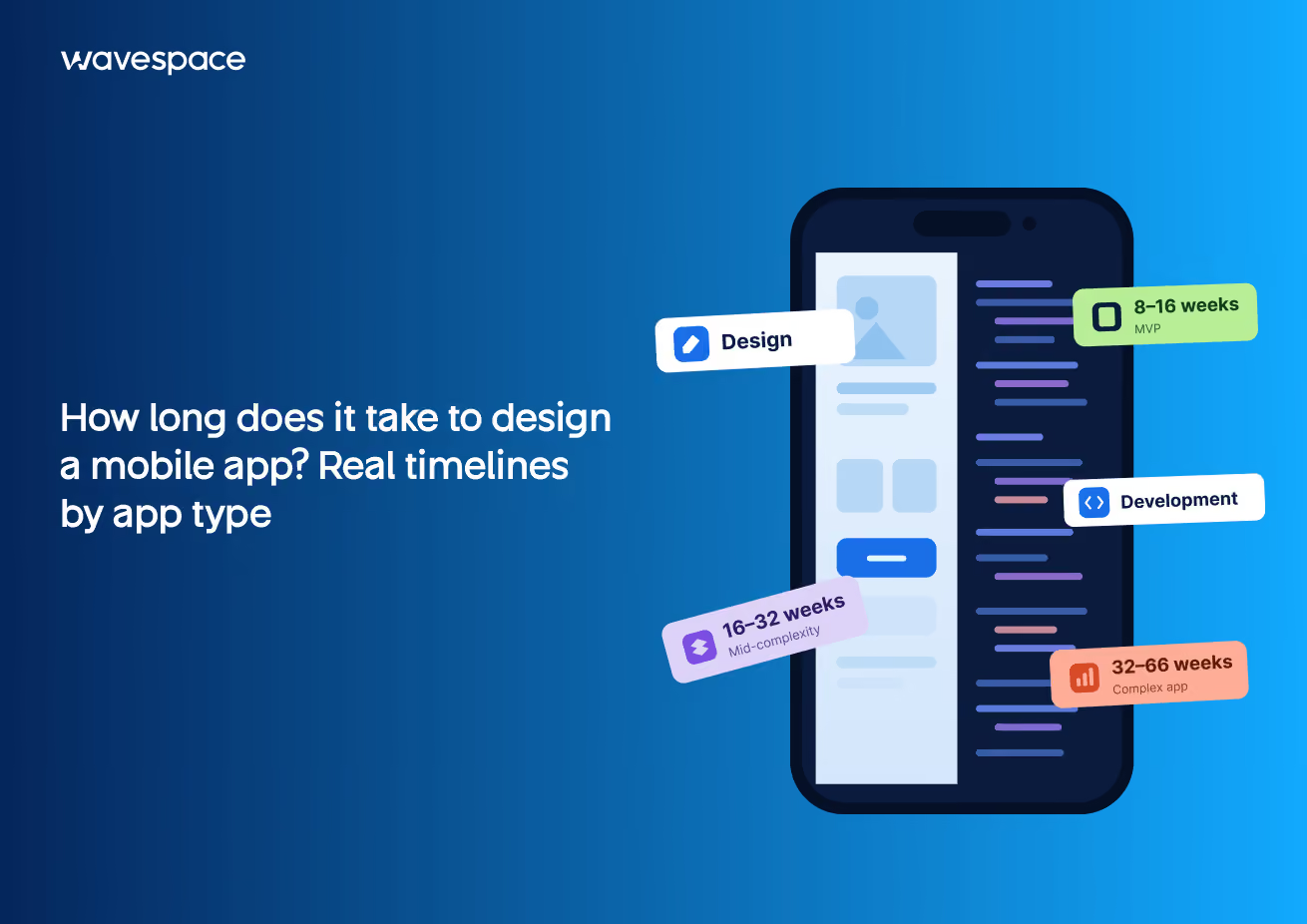
It depends on the app. For many projects, design takes a few weeks, while development takes a few months. Complex apps take longer on both sides. But time spent on design often shortens development, because developers start with a clear, tested plan instead of guesses.
Yes, and it's a good way to distribute expenses. Once you have a design completed, you can obtain development quotes, pitch investors, and validate your concept with actual users. Just make sure the handoff files are complete so any developer can access them later.
Mostly, yes. App design is UI/UX design applied to an app. UX design covers how the app works, like flows and structure. UI design covers how it looks, like colors, fonts, and buttons. A complete app design project includes both.
Usually, yes. Building is easier with AI and no-code tools, but there still needs to be a plan. A designer decides what to build, in what order, and how people move through it. Without that, you build a confusing app faster.
Bring your idea, who it's for, the problem it solves, and a rough budget. Share a few apps you love and why. You don't need screens or specs. A good agency will help you shape those during research and planning.

More related blog

Design & development in one team. Let’s talk!

















Francisco, CA 94105, United States