Webflow pricing explained: Which (best) plan is right for you?


If you are confused about which Webflow service plan is for you, you are not alone. You might have searched for "Webflow pricing" and probably noticed half the guides on the internet either don’t match or don't agree with each other.
That's not because anyone's making things up. Webflow changed its pricing in May 2026 and introduced new plans. And many articles still haven't caught up and have become outdated.
The old CMS and Business site plans no longer exist. If you're reading them, you are just wasting time.
Here's what's actually happening now: Webflow charges you for two separate things: 1. your site and 2. your team. Plus a newer all-in-one tier for companies that have outgrown self-serve, and a handful of add-ons.
This blog will help you understand how those four pieces fit together. After that, you can pick a Webflow plan best suited for you in just five minutes.
Take a deep dive to understand what Webflow is and how it works, including its key features, benefits, limitations, and how it compares to other website-building platforms.

How is Webflow's pricing actually structured?
Webflow tiers and pricing can be confusing for some. I will explain it simply so that you can understand it in seconds.
Webflow divides its pricing into four types, and most confusion comes when you only know one.
Site plans: For a single published website. They set your page count, your CMS item limit, and your bandwidth.
Workspace plans: For the people working in Webflow. This plan allows you to control how many people can collaborate, what roles they have to manage the site, and what design-side features are unlocked.
Platform plans: (Team and Enterprise) bundle both of the above into one package, aimed at organizations that don't want to piece together a Site plan, a Workspace plan, and seats and add-ons separately.
Add-ons: Optimize, Analyze, and Localize stack on top of whatever Site plan you're on, and they're priced by usage rather than a one-time fee.
Simplest way to picture this: the Workspace is your ticket into the amusement park, and the Site plan is what a specific ride offers once you're inside. You can be "in the park" for free forever on the Starter Workspace.
You only pay for a Workspace upgrade if you need real collaboration features.
Most solo builders never touch this plan at all; they just pay for a Site plan.
Site plan vs. Workspace plan
If you are developing a Webflow website alone without any team members, then the “Site plan” is a good start.
What are Webflow's site plans, and what do they cost in 2026

In May 2026, Webflow restructured its pricing and introduced new plan options. Currently, there are a total of three options for Site plans. A free Starter plan and two paid Basic and Premium plans. On top of that, one custom-quoted Teams option.
To clear the confusion, the old CMS and Business tiers have been merged into a single plan called Premium.
Starter (free):
A great way to get started with Webflow. The Starter plan is almost the same as before. It comes with the ability to host 2 static pages under the Webflow.io domain, limited CMS capabilities, and 1GB of bandwidth. To be honest, this package won’t get you any further. This plan is designed to test a design; you would not launch anything here.
Basic ($25 or 15$):
The Basic plan is an upgrade from the Starter plan. It costs $25 monthly and $15 monthly if you pay annually. This plan allows you to get a custom domain with 300 static pages, but without a CMS at all.
Truth is, the Basic plan means no blog, no dynamic content, nothing that updates itself. This plan is perfect if your site is a portfolio or a one-page landing page. If you want to post blogs, then you need to upgrade the plan.
Premium ($39 or $25):
The Premium is the successor of the old CMS and Business tiers. This plan is the reason many are confused about Webflow pricing. Webflow Premium plan is the most-used plan, especially by content-driven sites.
The Premium plan comes with 300 pages, 20,000 CMS items across 40 collections, customizable bandwidth (starting from 50GB to 2.5TB), plus code components, site search, and form file uploads.
This plan is perfect for you if you are planning to publish a blog. The best option for a resource library or for any kind of dynamic content.
Enterprise (Custom):
Enterprise custom pricing plan. It comes with unlimited scale, dedicated support, advanced security controls like SSO, and a guaranteed uptime SLA. Webflow doesn't publish a number here; you talk to sales.
A quick rule of thumb worth stealing: if you expect to publish more than a hundred blog posts in your first year, skip Basic and go straight to Premium. The price difference is small enough that it isn't worth hitting a CMS wall in six months and having to migrate content.
Find out the best Webflow design agencies you can trust.

What is the new Webflow Team plan, and how is it different from Enterprise?
Now you might have noticed a new plan called Team under the Platform name. The Team plan is designed for growing organizations that need more than a no-code website with CMS and hosting.
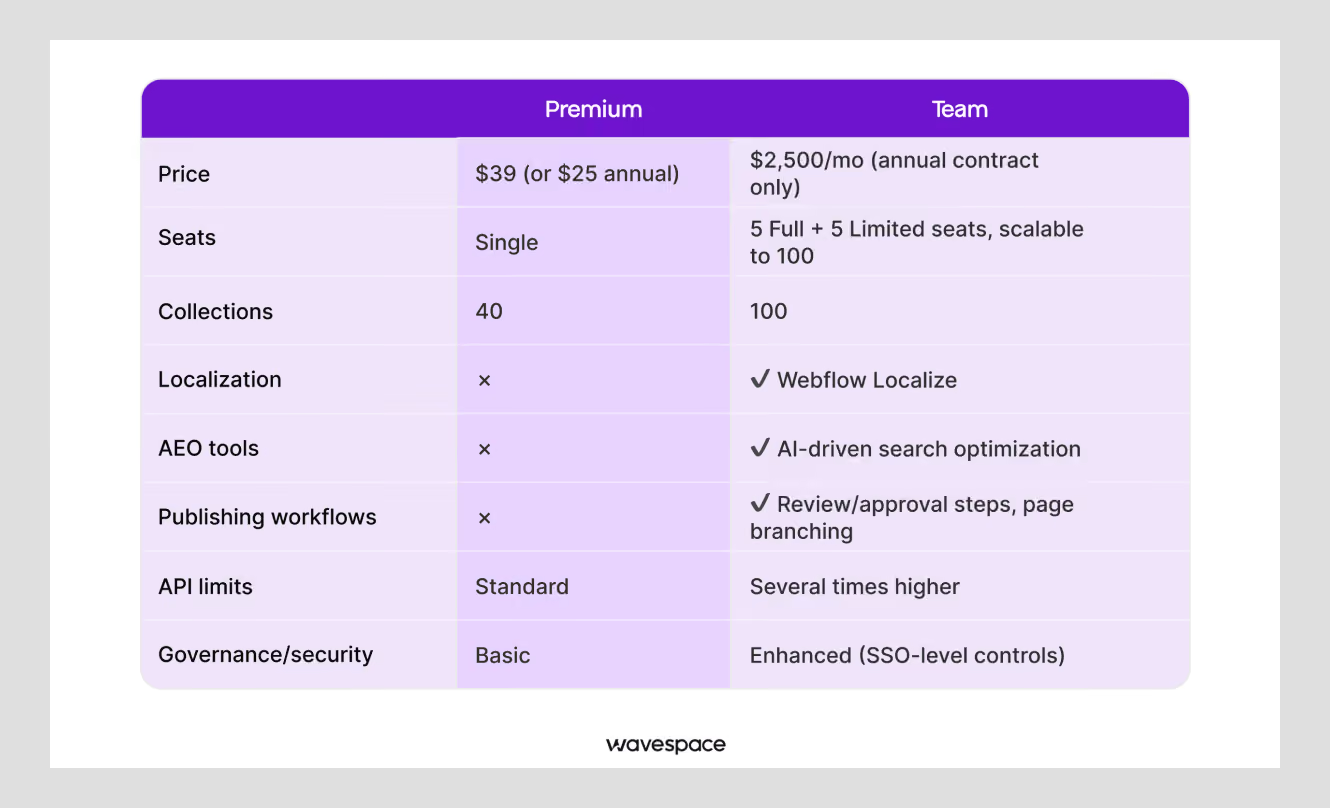
The Team plan is priced at $2,500/month, but it must be subscribed to on an annual contract.
This plan is a combination of the Premium Site Plan with advanced collaboration tools. This huge price point comes with Site & Workspace, Webflow Localize, AEO agents, Publishing workflows, Single-page publishing, Site activity log & API, Foundational governance, Enhanced security & compliance, and Priority support.
This all-in-one solution helps organizational teams to efficiently manage websites, streamline content publishing, and collaborate at scale.
Easy language: Team bundles multiple seats: 5 Full seats, 5 Limited seats & up to 100 seats, a much higher CMS ceiling (around 100 collections, versus Premium's 40), built-in localization, AI-driven search optimization tools, publishing workflows with review and approval steps, page branching for staged edits, and API rate limits several times higher than what self-serve plans get.
Webflow plan comparison: Starter vs. Basic vs. Premium vs. Enterprise
Webflow plan comparison: Premium vs. Team
How to know you've actually outgrown Webflow Site plans
Three signals show up frequently together when a team is ready for this jump:
- You're running into the 40-collection limit on Premium and in need of more room to publish your content.
- You need real workflow controls, like someone reviewing and approving a page before it goes live, and there's no way to build that on self-serve.
- You're doing a large migration or bulk content import and keep hitting API rate limits.
If none of that sounds familiar, you probably don't need Team. If two or three of those are already a headache, it's worth pricing out.
How much do Webflow Workspace plans and Seats cost?
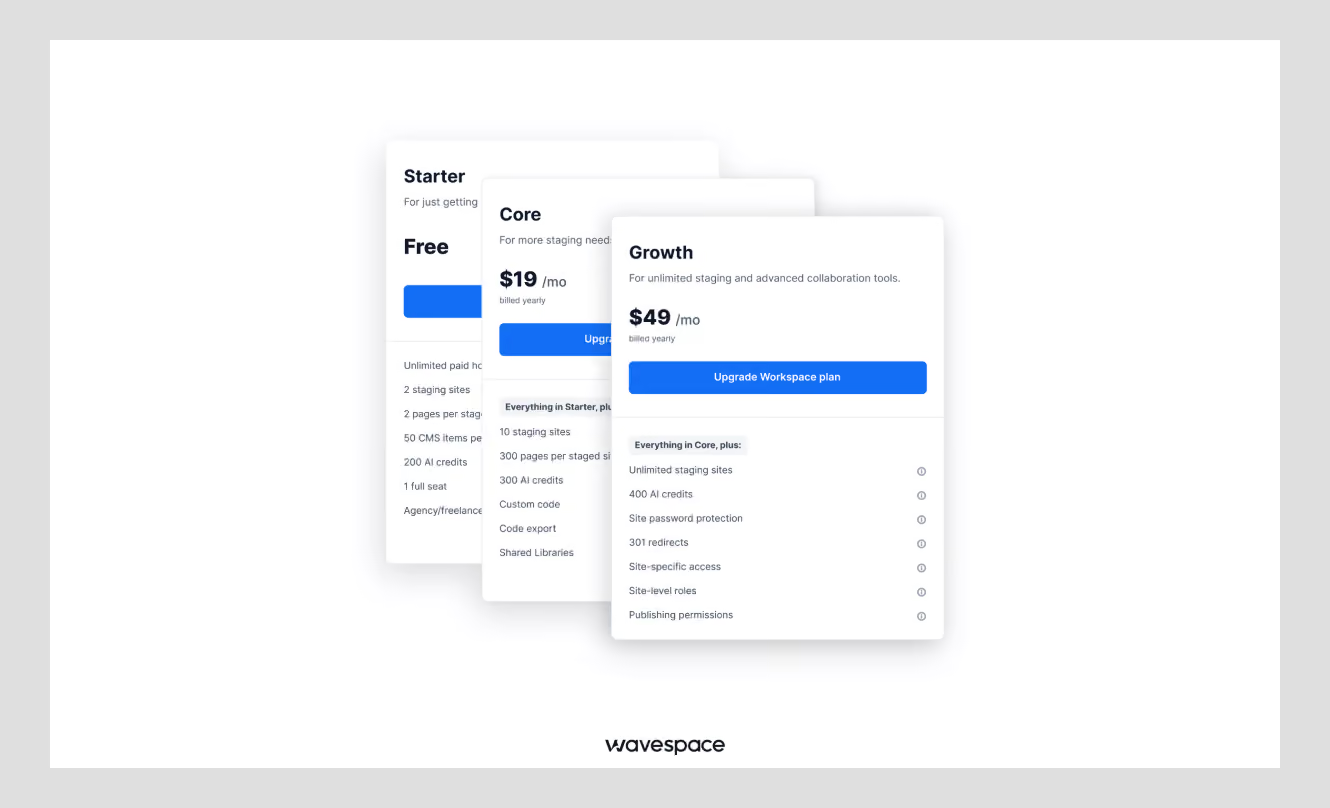
This is the part almost no guide explains clearly, and it's where Webflow surprises people. The price on the pricing page is not the actual amount you end up paying. That is because seats are purchased separately from the Workspace plan itself.
There are three Workspace tiers for in-house teams: Starter (free), Core ($19/month), and Growth ($49/month).
Freelancers and agencies get their own plans built around client billing and white-labeling.
On top of whichever Workspace you're on, you're paying per seat, and there are three seat types:
- Full Seat runs about $39/month and gives full Designer access plus admin permissions. This is for whoever's actually building the site.
- Limited Seat runs about $15/month and covers the Marketer or Content Editor role. No design access, just content editing.
- Free Seat (sometimes called a Reviewer seat) costs nothing and is comment-only, capped at 100 per Workspace. Good for stakeholders who just need to leave feedback.
One Full Seat is typically included with a paid Workspace. Everyone else you add costs extra.
Example: What a 5-person marketing team actually pays
Roughly, it would cost somewhere around $158 a month. Now let’s break down how.
Say you're a five-person marketing team on the Growth Workspace, running one site on Premium, with two people who need designer access and three just to edit content:
The realistic Webflow pricing would be
- Premium Site plan: $25
- Growth Workspace: $49
- One additional Full Seat (the first is included): about $39
- Three Limited Seats: about $45
That's not the $25 you assumed after seeing the pricing page alone. That is $158 and this pricing is the most confusing part of the Webflow. Furthermore, the reason is that larger teams lean toward the Team plan rather than stacking Workspace seats one after another.
How much does Webflow Ecommerce pricing cost?
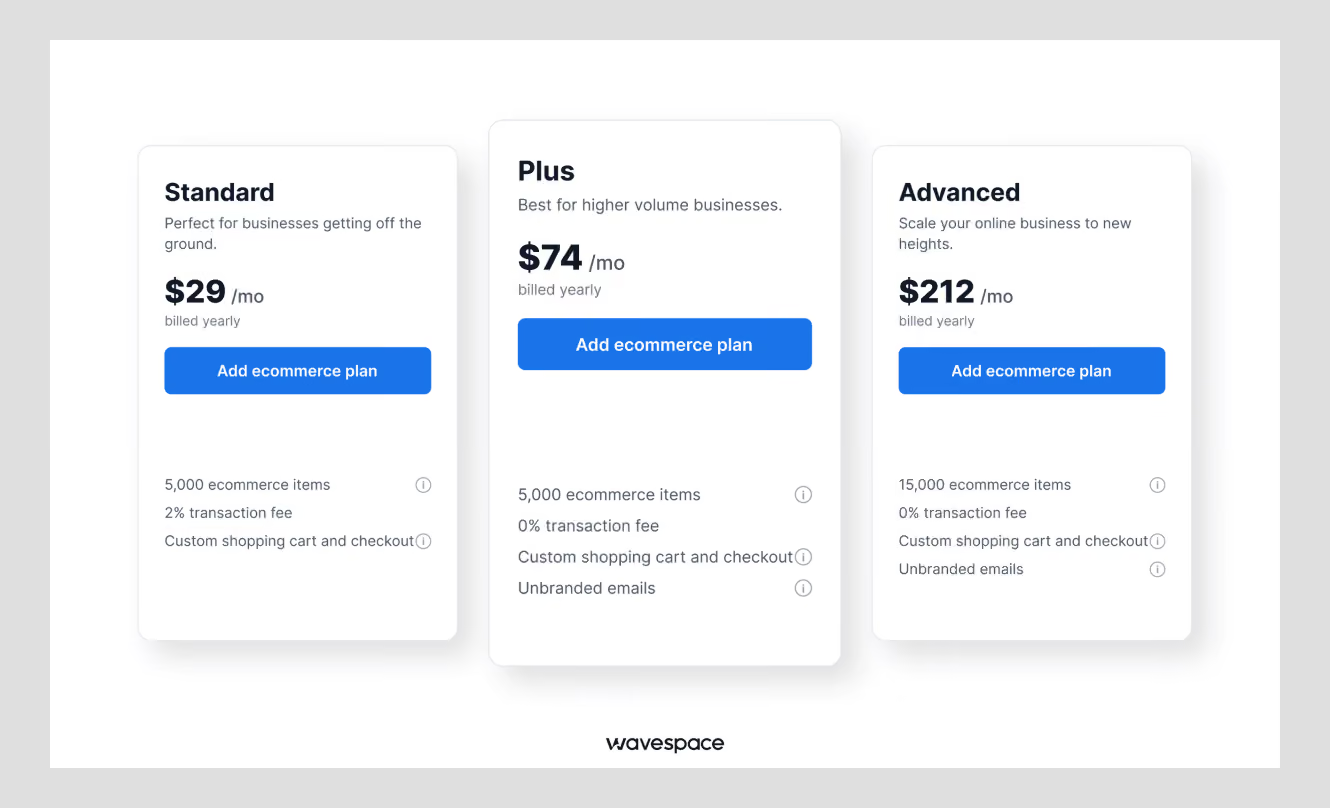
Webflow's Ecommerce is a set of features designed for online retail stores to run smoothly.
Ecommerce plans start from $29/month and are built on top of a regular Site plan. Webflow Ecommerce comes with three tiers. The part that trips people up is the transaction fee, not the monthly price.
Standard ($29/month): Up to 500 Ecommerce products, 2,000 CMS items, and 20 collections, but with a 2% transaction fee attached on every sale. This Webflow Ecommerce plan is fine even with transaction fees, especially when you're validating whether the store even works.
Plus ($74/month): Up to 5,000 products, 10,000 CMS items, 40 collections, and 0% transaction fee. Standard requires fees on every sale in addition to Stripe/PayPal's payment-processing fees, Plus, and Advanced have 0% Webflow transaction fees.
Advanced ($212/month): Up to 15,000 products, no transaction fee, built for stores with heavier catalogs or multi-region operations.
When should you upgrade from Standard to Plus?
If you're still in the "will my product even sell" phase, Standard is the best choice. Once you start generating revenue, upgrade to Plus or Advanced according to your financial comfort level.
Do the math:
- $1,000/month sales -> Standard costs $20 in Webflow fees
- $5,000/month -> $100
- $10,000/month -> $200
- $20,000/month -> $400
If you generate more than or up to $5,000/mo move to Plus and Advanced when you are making more than $11,000/mo.
What do Webflow’s add-ons (Optimize, Analyze, Localize and Advanced Localize) cost?
Webflow Add-ons Optimize ($299/mo), Analyze ($9/mo), Localize Essential ($9/mo), and Localize Advanced ($29/mo) go beyond the Site and Workspace plans with usage-based pricing that covers features Webflow doesn’t bundle by default.
Optimize: Starting from $299/month, price based on page views. Optimize is the most expensive Webflow add-on. It handles A/B testing, up to 5 optimizations, and AI-driven personalization. When to get it? Get it when the conversion-driven revenue from your top pages is ten times ($3,000). Don’t get it if you are below that. You don't have enough traffic to test anything.
Analyze: Starting at $9/month, Webflow's native analytics tool is lighter than GA4 Analytics and built right into your dashboard. This Webflow add-on is not meant to replace your analytics tools. It gives non-analyst team members a usable view without needing a different analytics tool.
Localize: Localize Essential runs $9, and Localize Advanced runs $29 per site per month. Webflow Localize add-ons are for making your website support multiple languages to reach a new audience. Get it when you need real multi-language URLs and a translation workflow. Worth noting: Localize is included free if you're already on the Team plan.
AI-driven search optimization tools aren't sold as standalone add-ons. They only come bundled with Team and Enterprise.
Which Webflow plan is right for you?
Pricing pages are made for a quick glance, which is why they feel confusing when you do the real math for Webflow plans. That being said, I will give you the information to get the best package plan for you.
Choose a Webflow plan that suits you:
Solo freelancer building client sites: Stick with the free Starter Workspace and buy a Premium Site plan per client needs. You don’t need any team collaboration plans for this. Get the domains' DNS info from the client and connect them on delivery.
Startup or solo marketer: Get the Basic plan if you're not publishing blogs, and get the Premium Site plan if you are planning to. Pair it with the free or Core Workspace.
A growing marketing team: Get the Premium Site plan along with the Growth from Webflow Workspace, with a mix of Full and Limited Seats, if you have a handful of people on your marketing team that need access to work on the website. Note: Keep an eye on that 40-collection limit as you grow.
An agency with multiple clients: Get the Agency Workspace tier, with Site plans for your client needs. You might need to get the add-ons if the client wants dual/triple language in their project. No need to worry, clients pay these bills for themselves.
An Ecommerce founder: Start with Premium Site plan and Standard Ecommerce plan, then move to Plus or Advanced when your business reaches the transaction-fee break-even point covered above.
A large or regulated organization: Custom-quoted Enterprise, on both the Site and Workspace side.
Is Webflow cheaper than WordPress?
Yes, the pricing on the website makes it look like WordPress costs less than Webflow, but on paper, the story is different. WordPress needs a 3rd-party hosting service to make the site live. And hosting alone can increase the budget by a few hundred dollars. But the story is different in Webflow’s case.
Webflow's total cost is lower for most small-to-mid projects. Especially when you add up hosting, plugins, maintenance, and the developer hours WordPress needs.
Webflow provides native hosting for its sites. On the other hand, WordPress needs a separate hosting platform for itself. Plus, a few different plugins, integration tools, and security; all of these increase the cost of WordPress websites.
This is the reason many organizations are shifting to Webflow. Businesses are looking for WordPress-to-Webflow design development services to make their transition.
Conclusion
People often get lost in Site, Workspace, Ecommerce plans, seats, and add-ons. But understanding Webflow pricing is easier than many realize; the trick is to understand what those “Webflow services” are.
If you want to build a simple website or portfolio, you can do it alone with the Webflow Basic plan. If you need a blog website, CMS, or dynamic content, Webflow Premium is the better choice.
Growing teams can consider Webflow Team, while larger organizations can choose Webflow Enterprise for advanced security, support, and scalability.
But the best Webflow plan depends on your website, content, team, and business needs. Get in touch with a Webflow agency to help you.
Frequently asked question

Webflow is a freemium service. You can use Webflow services for free with some limitations. You can upgrade your Webflow plan to get more features, options, and freedom.
Uploading, updating content, and developing basic portfolio websites on Webflow doesn’t require any coding. However, building a complex website with the Webflow framework needs an advanced understanding of HTML, CSS, and JavaScript.
Webflow is better for advanced users, designers, and developers. For users, Webflow comes with total control over content. And for designers & developers, Webflow comes with more freedom with clean code and integrations. On the other hand, Wix is tailored and makes it easy for beginners.
Yes, Webflow is better than WordPress in terms of page speed, zero maintenance, clean code, and fewer restrictions. Webflow doesn’t need manual updates and 3rd-party security like WordPress.
Yes, Webflow is more relevant than AI website builders. As of today there are no good AI website builders that provide frontend design, backend development, and security maintenance. AI might be good at making pretty landing pages, but to run a business you need more than that. AI websites might be good for portfolio and MVP landing pages, but Webflow shines for small and growth-stage businesses.
Yes, Webflow is better for non-technical people. Webflow offers more control to every team member of a business. The content team can publish content, and the marketing team runs new campaigns without needing a developer. Webflow gives the free plan to visually select elements and make changes, which is perfect for non-technical users who don’t know how to code.

More related blog


Design & development in one team. Let’s talk!
















.png)



Francisco, CA 94105, United States





































.avif)